Small features work fine. Brainstorm, plan, execute, ship.
Then you try to build something real. An ERP costing system. 17 tasks. Database migrations, API endpoints, real-time sync, frontend integration. A week of focused work.
That’s when it falls apart.
What actually breaks
Quality degrades. Not dramatically; you don’t notice it task by task. But by task 8, the code is sloppier. By task 12, decisions contradict earlier decisions. The plan that was clear at the start goes fuzzy at the edges. Death by a thousand cuts.
The agent loses track. Forgets what’s done versus what remains. You have conversations like:
“We already implemented that in task 4.” “Oh right, let me check…”
Sometimes it reimplements something that exists. Sometimes it skips something critical. Neither failure mode is obvious until you’re debugging production.
Session boundaries kill momentum. You’re 6 tasks in. You stop for the day. Close the session. Come back tomorrow.
The agent has no memory.
You spend 20 minutes re-explaining. It re-reads files it already understood. The nuanced context that took hours to build? Gone.
Even when compaction works, it doesn’t really work. The summary captures facts but loses judgment. The “why” disappears; only the “what” remains.
The root cause
All of these problems have the same source: the agent’s task state lives inside the agent.
Context window, session memory, compaction summaries: volatile storage. When it compresses, expires, or resets, the state disappears.
We don’t build applications this way. We don’t store critical state in memory and hope the process never restarts. Why would agent task state be different?
External task state
Beads is a git-backed task tracker for AI agents. Steve Yegge built it to solve exactly this problem.
Tasks live as JSON files in a .beads/ directory. Versioned, mergeable, persistent. The agent reads state from beads, does work, updates beads. Session dies, state survives.
But beads alone isn’t a workflow. It’s infrastructure.
The workflow
I built a pipeline on two foundations:
- Claude Superpowers: existing skill ecosystem with
writing-plans,code-reviewer(I extend thebrainstormingskill below) - Beads: external task tracker
Three custom skills bridge them:
flowchart LR
    B[brainstorming] --> D[Design Doc]
    D --> W[writing-plans]
    W --> P[plan-to-epic]
    P --> E[epic-executor]
E --> C[Complete]| Stage | Input | Output |
|---|---|---|
| Brainstorming | Idea | Design doc |
| Planning | Design doc | Implementation plan |
| Epic Creation | Plan | Beads epic with tasks |
| Execution | Epic ID | Implemented feature |
Human judgment happens in brainstorming and planning. That’s where it matters. Execution is autonomous.
Brainstorming
Collaborative dialogue. Ask questions one at a time. Propose 2-3 approaches. Present design in sections, validate each.
Output: docs/plans/YYYY-MM-DD-<topic>-design.md
Then a checkpoint: “Design complete. Ready to create the implementation plan?”
Human approves before moving forward. No surprises.
Planning
The superpowers:writing-plans skill converts design into detailed tasks. Files to modify, step-by-step instructions, code snippets, verification commands.
Another checkpoint. Human reviews the plan.
Plan to epic
This is where beads enters.
The plan-to-epic skill parses the plan and creates a beads epic. Three interesting parts: dependency inference, field separation, and design context embedding.
File overlap detection. If Task 4 and Task 5 both modify item-block.tsx, Task 5 depends on Task 4. The skill tracks file touches and creates edges automatically.
Three-field separation. Each task gets content split across three fields:
| Field | Purpose | Content |
|---|---|---|
| Description | What to do | Implementation steps, code snippets, file paths, testing commands |
| Design | Why and how it fits | Epic goal, architecture context, relevant design decisions |
| Notes | Fallback references | Source document paths with line numbers |
This separation matters. The implementing subagent reads the description for the mechanics. When it needs to make a judgment call (should this be a hook or inline logic?), it checks the design field for architectural context. The notes field exists as a fallback if the extraction missed something.
Design context embedding. When you pass --design docs/plans/...-design.md, the skill extracts architecture decisions, data flow, error handling strategies, and component relationships. It then includes only the relevant portions in each task’s design field. Task 3 doesn’t need to know about the authentication design if it’s working on PDF rendering.
This is the key. Context is embedded, not referenced. The design document flows through the pipeline: brainstorming produces it, plan-to-epic extracts it per-task, and the subagent has what it needs to make correct architectural decisions without reading the original documents.
Epic execution
The epic-executor skill loops until 100% complete:
- Get next ready task (no blockers)
- Dispatch fresh subagent to implement
- Spec compliance review: did you build what was requested?
- Code quality review: is the code good?
- Fix issues if either review fails
- Close task
- Repeat
Fresh subagent per task. No context pollution.
Two-stage review catches both “wrong thing built” and “right thing built badly.”
Resumability
Here’s the point.
When you come back and say continue epic platform-2wl, the executor checks bd epic status, sees which tasks are closed, gets the next ready task, continues.
No re-explanation. No lost context.
The state survived because it lives in beads, not in the agent’s context window.
Real example
Here’s the actual epic I’m running:
platform-2wl.17 [P0] open     - Phase 9: Production Rollout
platform-2wl.16 [P0] open     - Phase 8: Testing and Hardening
platform-2wl.15 [P0] open     - Phase 7: Frontend Integration
platform-2wl.14 [P0] open     - Phase 6: MQTT and Real-Time Sync
platform-2wl.13 [P0] open     - Phase 5: Edge API and ActionService
platform-2wl.12 [P0] open     - Phase 4: Sync and Conflict Resolution
platform-2wl.11 [P0] open     - Create POST /api/relay/bootstrap Endpoint
platform-2wl.10 [P0] open     - Create GET /api/relay/status Endpoint
platform-2wl.9  [P0] open     - Create GET /api/relay/schema/target Endpoint
platform-2wl.8  [P0] open     - Add Bootstrap Configuration Schema
platform-2wl.7  [P0] open     - Design Edge Daemon PostgreSQL Schema
platform-2wl.6  [P0] open     - Move RestService with Generic Context
platform-2wl.5  [P0] open     - Move EntityLedgerRecord to @tracktile/common
platform-2wl.4  [P0] in_progress - Create @tracktile/common Package Structure
platform-2wl.3  [P0] closed   - Add cloud_received_at Column
platform-2wl.2  [P0] closed   - Create synced_transactions Table
platform-2wl.1  [P0] closed   - Create relay_flows Join Table
17 tasks. Currently on task 4. Three closed, one in progress, thirteen remaining.
I can view this in the CLI or in a visual interface.
Tooling
Beads CLI
bd init                              # Initialize
bd create --type=epic --title="..."  # Create epic
bd create --type=task --parent=...   # Create task
bd list --parent=<epic-id>           # List tasks
bd show <task-id>                    # Show details
bd update <task-id> --status=in_progress
bd close <task-id> --reason="Done"
bd ready --parent=<epic-id>          # Next ready task
bd blocked --parent=<epic-id>        # What's blocking
bd dep add <task> <dependency>       # Add dependency
bd epic status <epic-id>             # Completion %
beads-ui
beads-ui is a local web interface.
npm i beads-ui -g
bdui start --open
Issues view, epics view, board view. Live updates. Keyboard navigation.
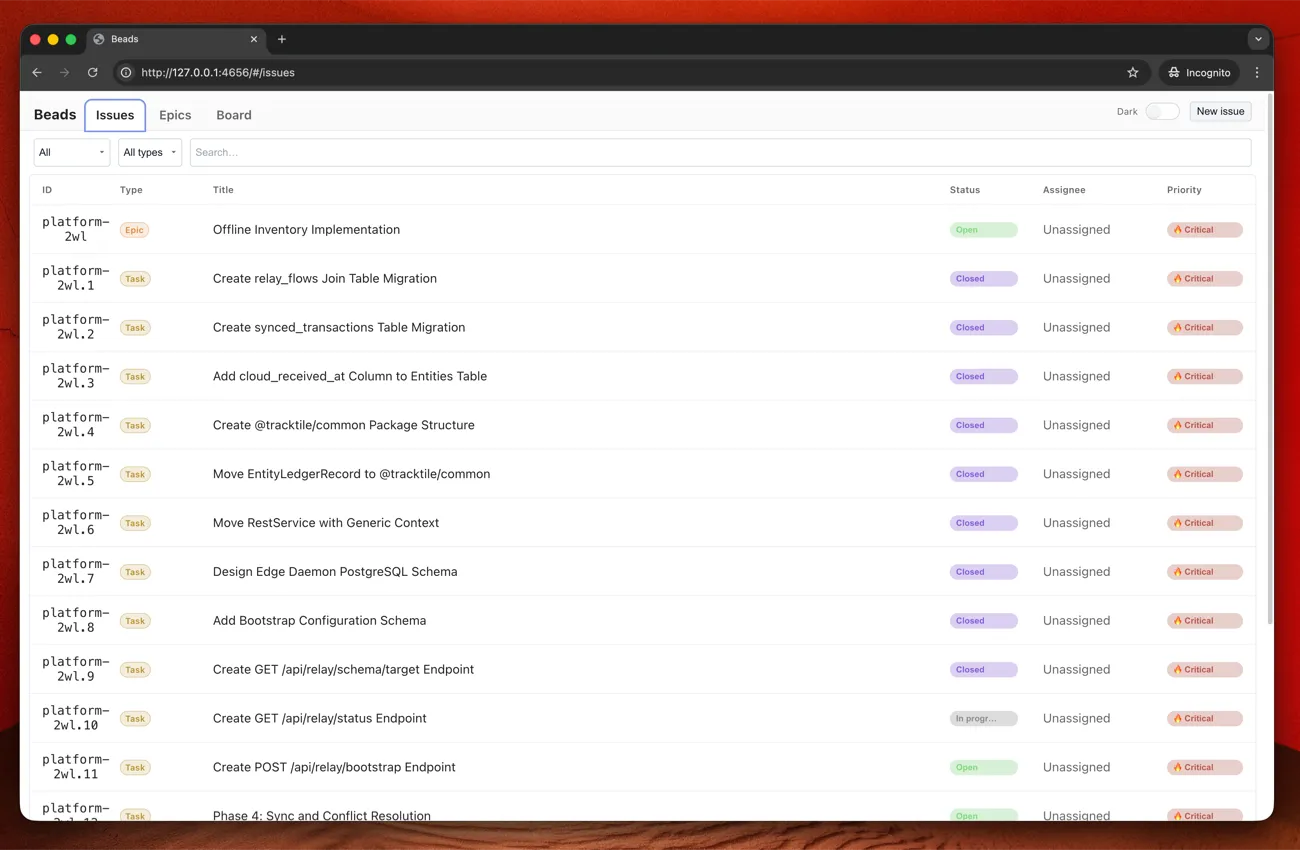
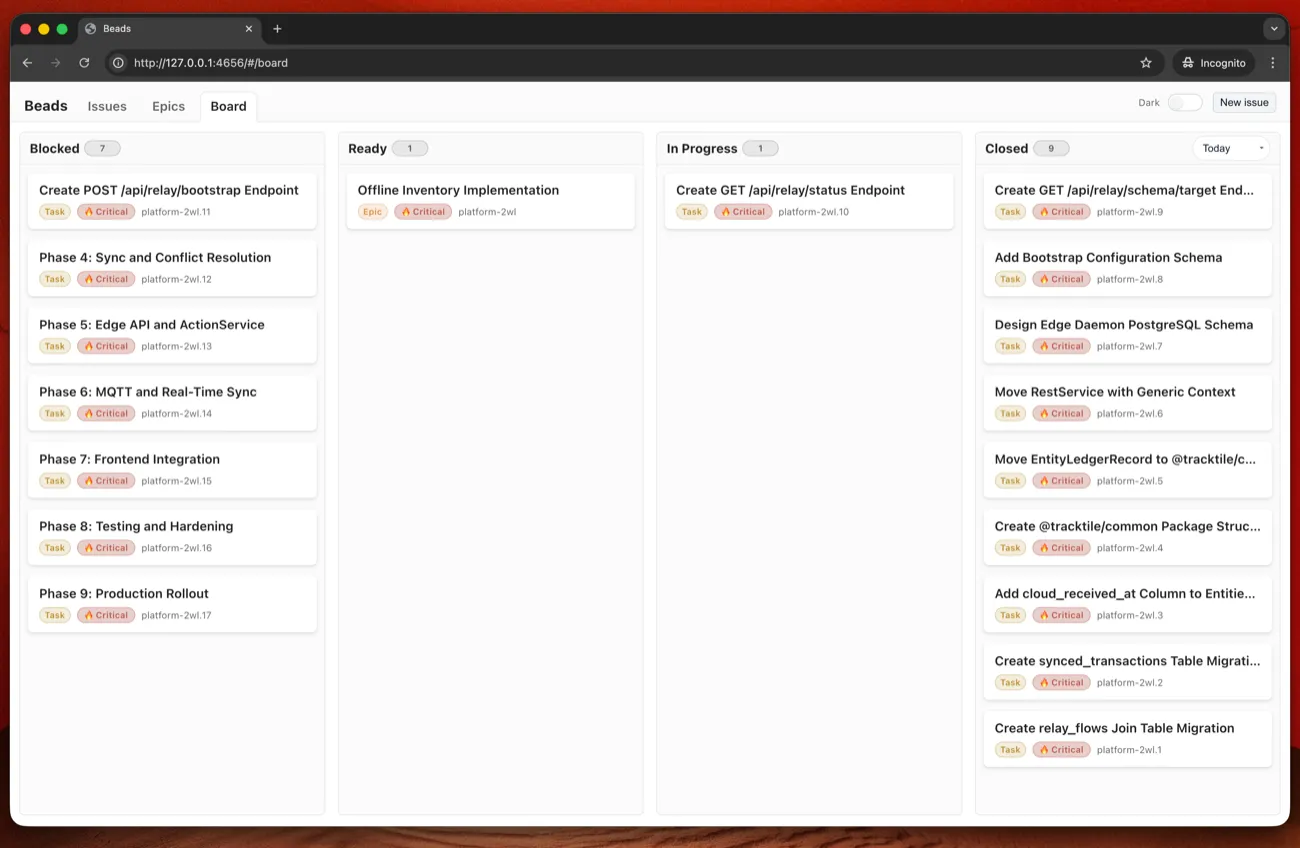
Update: I’ve submitted a PR adding epic filtering to the board view - being able to filter the board to a single epic makes tracking large features much easier. Hopefully it gets merged.
beads_viewer
beads_viewer is another option for visualizing progress.
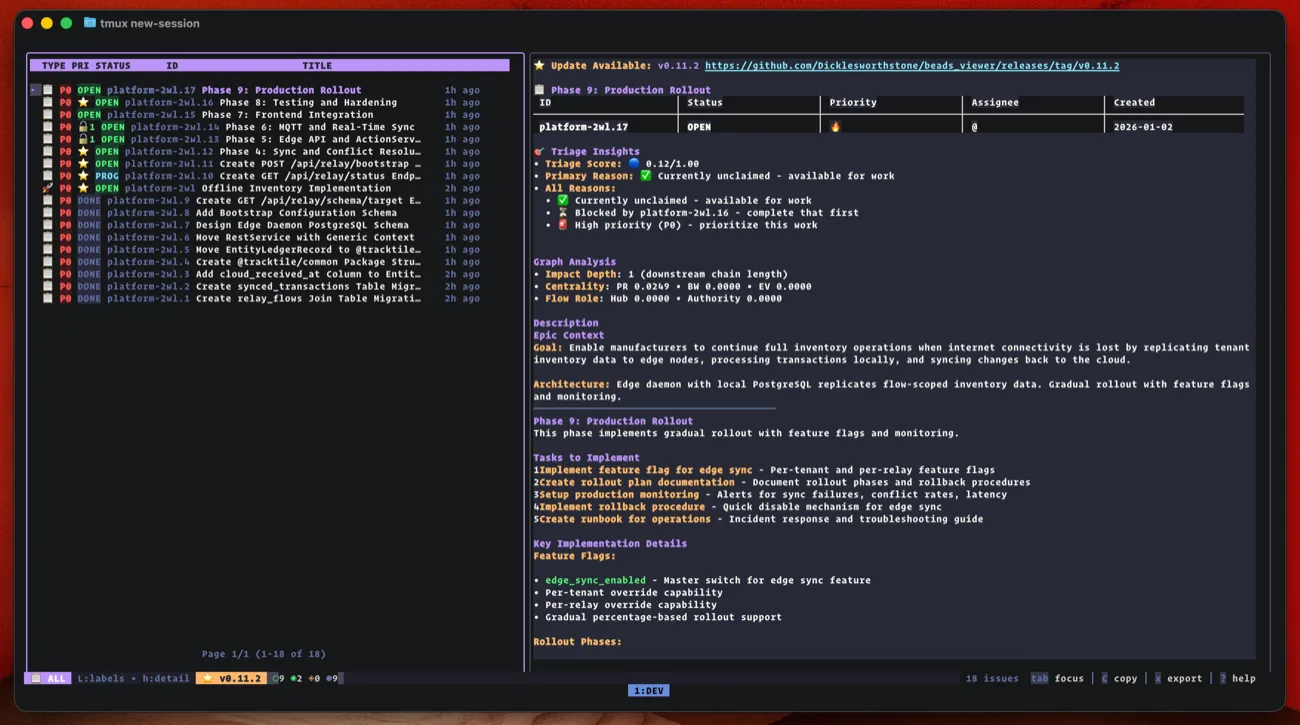
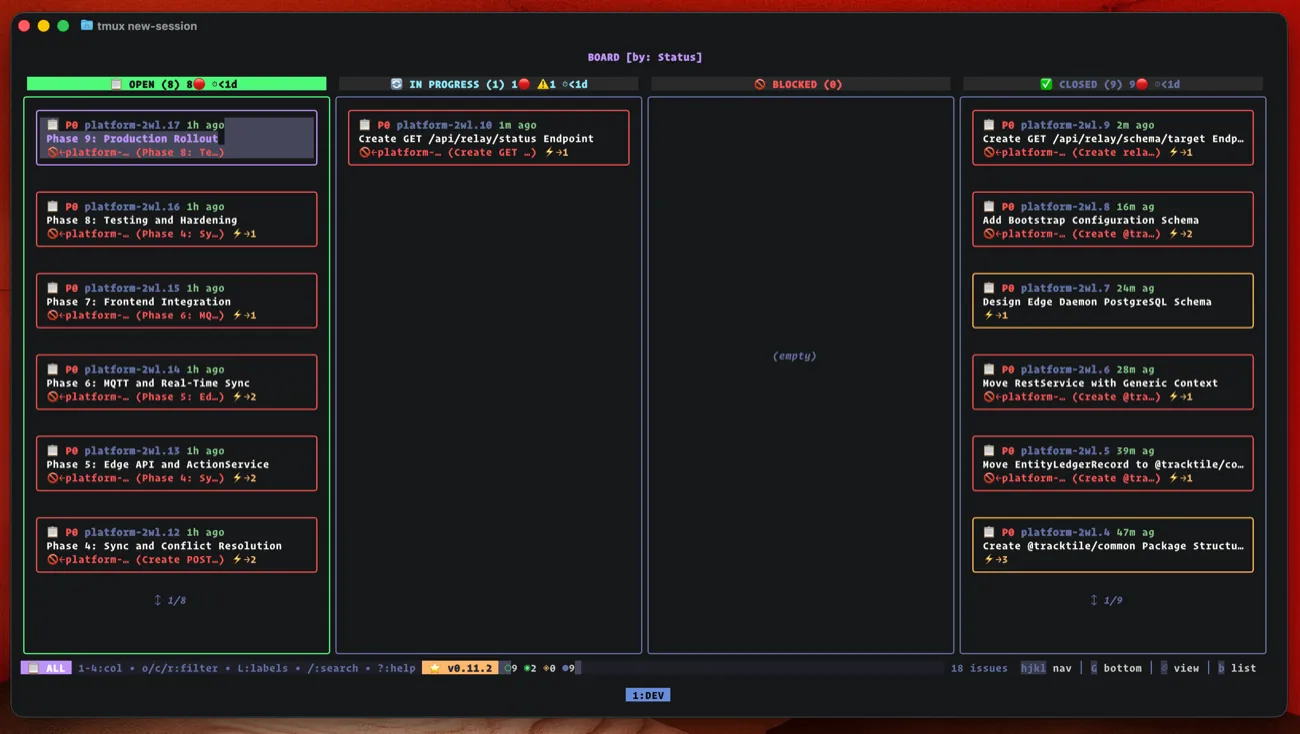
I bounce between CLI and these depending on what I need.
The skills
Here are the three custom skills. To use them:
- Install Claude Code
- Install Superpowers
- Install Beads
- Create these in
~/.claude/skills/
brainstorming
The brainstorming skill below is my version of the one provided by Superpowers, extended to chain into the beads workflow. The original focuses on design; this one continues through epic creation and execution.
~/.claude/skills/brainstorming/skill.md:
---
name: brainstorming
description: "You MUST use this before any creative work - creating features, building components, adding functionality, or modifying behavior. Explores user intent, requirements and design, then chains into full implementation pipeline."
---

# Brainstorming Ideas Into Designs

## Overview

Help turn ideas into fully formed designs and specs through natural collaborative dialogue, then execute them to completion.

Start by understanding the current project context, then ask questions one at a time to refine the idea. Once you understand what you're building, present the design in small sections (200-300 words), checking after each section whether it looks right so far.

**This skill chains into the full implementation pipeline:**
```
Brainstorming -> Design Doc -> Implementation Plan -> Beads Epic -> Execution
```

## The Process

**Understanding the idea:**
- Check out the current project state first (files, docs, recent commits)
- Ask questions one at a time to refine the idea
- Prefer multiple choice questions when possible, but open-ended is fine too
- Only one question per message - if a topic needs more exploration, break it into multiple questions
- Focus on understanding: purpose, constraints, success criteria

**Exploring approaches:**
- Propose 2-3 different approaches with trade-offs
- Present options conversationally with your recommendation and reasoning
- Lead with your recommended option and explain why

**Presenting the design:**
- Once you believe you understand what you're building, present the design
- Break it into sections of 200-300 words
- Ask after each section whether it looks right so far
- Cover: architecture, components, data flow, error handling, testing
- Be ready to go back and clarify if something doesn't make sense

## After the Design

### Phase 1: Documentation

- Write the validated design to `docs/plans/YYYY-MM-DD-<topic>-design.md`
- Commit the design document to git

### Phase 2: Implementation Plan

Ask: **"Design complete. Ready to create the implementation plan?"**

If yes:
- Use `superpowers:writing-plans` to create detailed implementation plan
- Output: `docs/plans/YYYY-MM-DD-<topic>-plan.md`
- Commit the plan to git

### Phase 3: Plan Review (CHECKPOINT)

Present the plan summary to user:

```
Implementation plan created: docs/plans/YYYY-MM-DD-<topic>-plan.md

Tasks: <N>
Estimated complexity: <low/medium/high based on task count and dependencies>

Review the plan and confirm:
- Are the tasks correctly scoped?
- Are there any missing steps?
- Ready to create the beads epic?
```

**Wait for user approval before proceeding.**

If user requests changes:
- Update the plan
- Re-present for approval

### Phase 4: Epic Creation

Once plan is approved:
- Use `/plan-to-epic docs/plans/YYYY-MM-DD-<topic>-plan.md`
- Creates beads epic with:
  - All tasks as P0 priority
  - Acceptance criteria from "Expected:" lines
  - Dependencies inferred from file overlap
- Output: Epic ID (e.g., `platform-xyz`)

### Phase 5: Execution

Ask: **"Epic created: <epic-id>. Ready to start execution?"**

If yes:
- Use `/epic-executor <epic-id>`
- Parallel subagent execution for independent tasks
- Two-stage review (spec compliance + code quality)
- Loops until epic 100% complete

## Key Principles

- **One question at a time** - Don't overwhelm with multiple questions
- **Multiple choice preferred** - Easier to answer than open-ended when possible
- **YAGNI ruthlessly** - Remove unnecessary features from all designs
- **Explore alternatives** - Always propose 2-3 approaches before settling
- **Incremental validation** - Present design in sections, validate each
- **Be flexible** - Go back and clarify when something doesn't make sense
- **Plan is the checkpoint** - User reviews plan before epic creation
- **Execution is autonomous** - Once approved, epic-executor runs to completion

## When NOT to Use Full Pipeline

For very small changes (single file, few lines), skip the pipeline:
- Quick bug fixes
- Minor refactors
- Documentation updates
- Config changes

Ask: "This seems small enough to do directly. Should I just implement it, or go through the full planning process?"
plan-to-epic
~/.claude/skills/plan-to-epic/skill.md:
---
name: plan-to-epic
description: Convert a superpowers implementation plan into a beads epic with properly structured tasks, acceptance criteria, and inferred dependencies
---

# Plan to Epic

Convert implementation plans (from `superpowers:writing-plans`) and design documents (from `superpowers:brainstorming`) into beads epics ready for `epic-executor`.

## Usage

```
/plan-to-epic <path-to-plan.md>
/plan-to-epic docs/plans/2026-01-01-feature-plan.md
/plan-to-epic docs/plans/2026-01-01-feature-plan.md --design docs/plans/2026-01-01-feature-design.md
/plan-to-epic docs/plans/2026-01-01-feature-plan.md --epic-id platform-xyz
```

**Flags:**
- `--design <path>` - Include design document for additional context (architecture, data flow, decisions)
- `--epic-id <id>` - Add tasks to existing epic instead of creating new one

## Workflow

### Step 1: Read and Parse Documents

**Read the plan file and extract:**

From header:
- Title and goal
- Architecture overview
- Tech stack

From each task section:
- Task title
- Files to modify
- Step-by-step instructions
- Code snippets
- Expected outcomes

**If `--design` provided, also extract:**

- Architecture decisions and rationale
- Data flow descriptions
- Error handling strategies
- Component relationships
- Testing approach
- Any constraints or requirements

Store this as `design_context` for inclusion in tasks.

### Step 2: Create Epic

If `--epic-id` not provided, create new epic:

```bash
bd create --type=epic --priority=0 --json \\
  --title="<Plan Title>" \\
  --body-file=/tmp/epic-body.md
```

### Step 3: Analyze Dependencies

**File overlap detection:**
- Track which files each task modifies
- If Task N modifies a file that Task M also modifies, and M > N, then Task M depends on Task N

**Explicit references:**
- Scan task content for patterns like "after Task N", "builds on Task N"
- Create explicit dependency

### Step 4: Build Task Content

For each task, create content for three separate fields:

**Description (--body-file):** Implementation-focused content - what to do:
- Task summary
- Files to modify
- Implementation steps (full detail, not summarized)
- Code snippets
- Testing requirements
- Verification steps
- Commit guidance

**Design (--design):** Context and rationale - why and how it fits:
- Epic goal and architecture context
- Tech stack from plan header
- Relevant design decisions (extracted from design doc if provided)

**Notes (--notes):** Source document references as fallback:
- Plan path with line numbers for this task
- Design path if provided

### Step 5: Extract Acceptance Criteria

Build from multiple sources:
- "Expected:" lines in the plan
- Verification steps
- Test descriptions
- Standard criteria (pnpm check passes, tests pass, code committed)

### Step 6: Create Tasks

```bash
bd create --type=task --priority=0 --json \\
  --parent=<epic-id> \\
  --title="<Task Title>" \\
  --acceptance="<acceptance criteria>" \\
  --body-file=/tmp/task-N-body.md \\
  --design "$(cat /tmp/task-N-design.md)" \\
  --notes "Source: Plan <path> (lines N-M); Design <path>"
```

### Step 7: Add Dependencies

```bash
bd dep add <dependent-task-id> <dependency-task-id> --json
```

### Step 8: Output Summary

```
Created epic: platform-abc "Feature Name"

Source documents:
  Plan: docs/plans/2026-01-01-feature-plan.md
  Design: docs/plans/2026-01-01-feature-design.md

Tasks (9):
  platform-abc.1: Task 1 Title [no dependencies]
    - Description: 847 words (implementation)
    - Design: 156 words (context)
  platform-abc.2: Task 2 Title [depends on: .1]
  ...

Ready to execute:
  /epic-executor platform-abc
```

## Key Principles

1. **Separation of concerns** - Description for implementation, Design for context, Notes for references
2. **Preserve full detail** - Never summarize implementation steps
3. **Comprehensive acceptance criteria** - Extract from all sources
4. **Always use --json** - All `bd` commands use `--json` for reliable parsing
5. **Include design context** - When available, add relevant design decisions in the Design field
epic-executor
~/.claude/skills/epic-executor/skill.md:
---
name: epic-executor
description: Execute a beads epic using subagent-driven development - sequential task execution with two-stage review (spec compliance, then code quality)
---

# Epic Executor

Execute all tasks within a beads epic using subagent-driven development. Tasks run sequentially with two-stage review after each.

## Usage

```
/epic-executor <epic-id>
```

## Setup Phase

### 1. Validate Epic

```bash
bd show <epic-id> --json
bd epic status <epic-id> --json
```

If epic doesn't exist or is already 100% complete, inform user and stop.

### 2. Note Base SHA

Record git SHA before starting for code review context:

```bash
git rev-parse HEAD
```

## Execution Loop

Process one task at a time until epic complete:

### 1. Check Completion

```bash
bd epic status <epic-id> --json
```

If 100% complete, announce completion and stop.

### 2. Get Next Ready Task

```bash
bd ready --parent=<epic-id> --limit=1 --json
```

If no tasks ready but epic incomplete, check `bd blocked --parent=<epic-id> --json` and report what's blocking.

### 3. Claim Task

```bash
bd update <task-id> --status=in_progress --json
```

### 4. Dispatch Implementer Subagent

Use subagent-driven-development pattern. Dispatch a fresh subagent with:
- Full task description from bd show (the Description field)
- Task design context (the Design field)
- Epic context
- Instructions to ask questions before starting
- Self-review checklist before reporting back

**If subagent asks questions**: Answer them, then let them continue.

### 5. Spec Compliance Review

Dispatch spec reviewer subagent to verify implementation matches specification.

**Critical:** The reviewer must read actual code and compare to requirements line by line. It does NOT trust the implementer's self-report.

Report: APPROVED or NEEDS_CHANGES with specific file:line references.

### 6. Code Quality Review

**Only after spec compliance passes.**

Use `superpowers:code-reviewer` subagent. Focus on:
- Security issues
- Test coverage
- TypeScript best practices
- Performance concerns

### 7. Handle Review Results

**If either review finds issues:**
1. Dispatch fix subagent with specific issues to address
2. Re-run the review that found issues
3. Repeat until both reviews pass

**If both reviews pass:** Proceed to close.

### 8. Close Task

```bash
bd close <task-id> --reason="Implemented and verified" --json
```

### 9. Continue

Go back to step 1 for next task.

## Completion

When `bd epic status <epic-id> --json` shows 100%:

```
Epic <epic-id> complete!

Summary:
- Tasks completed: N
- All implementations reviewed and verified
```

## Key Principles

1. **Sequential execution** - One task at a time, no parallel conflicts
2. **Fresh subagent per task** - No context pollution between tasks
3. **Two-stage review** - Spec compliance first, then code quality
4. **Fix before closing** - Tasks with review issues get fixed, not skipped
5. **Use beads, not TodoWrite** - Track with `bd update` and `bd close`
6. **Always use --json** - All `bd` commands use `--json` for reliable parsing
The shift
Before: babysitting. Re-explaining context. Correcting forgotten decisions. Watching quality degrade.
After: I brainstorm and plan (that’s where judgment matters), then continue epic platform-2wl and walk away. The agent implements, reviews itself, fixes issues, commits, moves on.
I check progress in the UI. Intervene when something genuinely needs human judgment. Not to remind the agent what it was doing.
Trust is higher. I stop and correct less.
There’s a real decoupling now. I do the thinking. The agent does the mechanical work. Neither of us loses track.
Getting started
- Install Beads
- Install Superpowers
- Install beads-ui:
npm i beads-ui -g && bdui start --open - Create the skills: copy the three above into
~/.claude/skills/ - Try it: “I want to build a feature that does X”
The brainstorming skill triggers and guides you through the pipeline.
If your AI coding workflow breaks down on large features, the problem probably isn’t the agent.
It’s that you’re storing state in the wrong place.